Appendix-FileDescriptor (in MacOS and UnixOS)
Appendix-FileDescriptor (in MacOS and UnixOS)
File Descriptors
- In MacOS and most of Unix OS
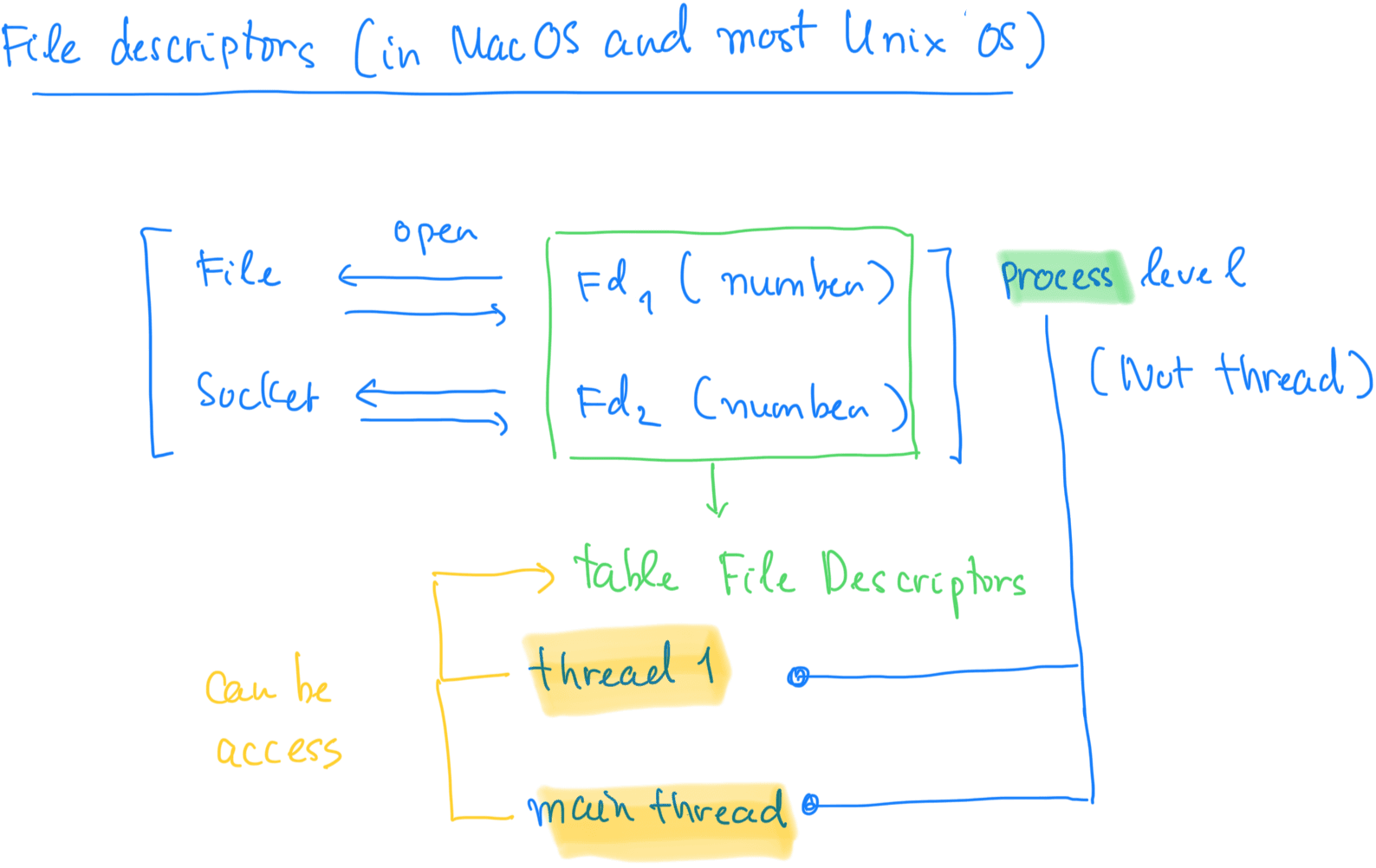
In macOS (and most Unix-like operating systems), file descriptors are managed by processes, not threads.
Here's a breakdown of how it works:
-
File Descriptors and Processes:
- When a process opens a file or socket, the operating system assigns a file descriptor (an integer value) to it. This file descriptor is used to perform operations like reading or writing to the file, or communicating over a network.
- Each process has its own file descriptor table, which keeps track of the file descriptors and their associated resources (like open files, sockets, etc.).
-
Threads and File Descriptors:
- Threads within a process share the same file descriptor table, meaning that any thread within a process can use the file descriptors opened by other threads in the same process. This allows multiple threads to access the same files or sockets concurrently.
- However, file descriptors themselves are not tied to specific threads. Instead, they belong to the process and are shared among all threads of that process.
-
Concurrency Considerations:
- While threads can access the same file descriptors, you might still need to use synchronization mechanisms (like mutexes) to avoid race conditions if multiple threads are interacting with the same file descriptor simultaneously.
In summary, file descriptors are managed at the process level, but threads within a process can share and use them.
Example 1: List all file descriptors in current process
import os

os.listdir("/dev/fd")

"""
The output is number that OS to identify resources to manage

{
    "0": "Standard Input (stdin)",
    "1": "Standard Output (stdout)",
    "2": "Standard Error (stderr)",
    "3": "File descriptor 3, could be a file, socket, or pipe",
    "4": "File descriptor 4, could be a file, socket, or pipe",
    # Additional file descriptors could follow depending on the environment
}

"""
['0', '1', '2', '3', '4', '5', '6', '7', '8', '9', '10', '11', '12', '13', '14', '15', '16', '17', '18', '19', '20', '21', '22', '23', '24', '25', '26', '27', '28', '29', '30', '31', '32', '33', '34', '35', '36', '37', '38', '39', '40', '41', '42', '43', '44', '45', '46', '47', '48', '49', '50', '51', '52', '53', '54', '55', '56', '57', '58', '59', '60', '61', '62', '63', '64', '65', '66', '67', '68', '69', '70', '71', '72', '73', '74', '75', '76', '77', '78', '79', '80', '81', '82', '83', '84', '85', '86', '87', '88']
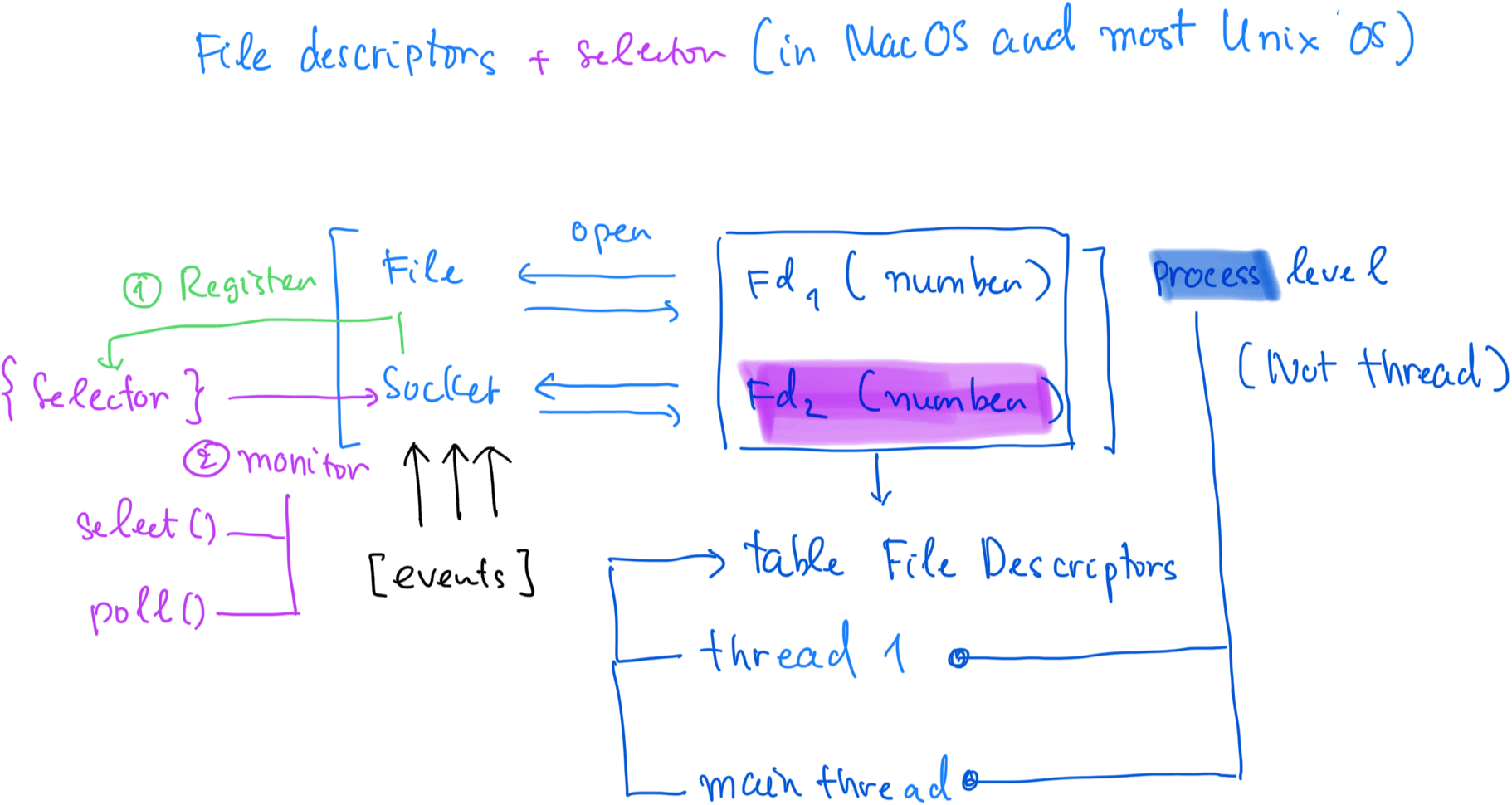
Example 2: Use selectors modules to monitor I/O events on sockets or file object
import selectors
import socket

# Create a default selector (selects for read/write events)
selector = selectors.DefaultSelector()

# Create a socket
sock = socket.socket(socket.AF_INET, socket.SOCK_STREAM)

# Bind and listen
sock.bind(('localhost', 12345))
sock.listen()

# Register the socket to listen for incoming connections
selector.register(sock, selectors.EVENT_READ)

# Blocking call that waits for events
events = selector.select(timeout=1)  # Check for events with a timeout

for key, events in events:
    if key.fileobj == sock:
        connection, address = sock.accept()  # Accept a new connection
        print(f"Accepted connection from {address}")
-
Creating a socket:
-
When you call
socket.socket(), you're creating a new socket object. Under the hood, the operating system allocates a file descriptor for the socket, and this FD represents the open socket. -
The socket will be assigned a number, starting from the lowest available FD in the process's FD table (usually starting from 3, since 0, 1, and 2 are already reserved for stdin, stdout, and stderr).
-
-
Binding and listening:
- When you call
sock.bind(('localhost', 12345)), the socket is bound to the IP address localhost (127.0.0.1) and port12345. - The operating system configures this socket to listen for incoming connection requests. At this point, it is still an open socket, and the OS manages it using the file descriptor that was allocated to the socket.
- When you call
-
FD and the
selectorsmodule:- The socket FD is a low-level I/O resource that is registered in the kernel’s file descriptor table, and it can be monitored for I/O events (e.g., whether it's ready to read or write).
- If you use the selectors module, you can register this socket (file descriptor) with a selector to monitor when the socket is ready to accept new connections (for a server) or when there’s data to read (for a client).